
Documentation
Browse our complete guides and API reference. View Docs →
Campaign Cart JS SDK can be installed in multiple ways to fit your development workflow. Choose the method that works best for your project.
The fastest way to get started is with our CDN:
Get Your API Key
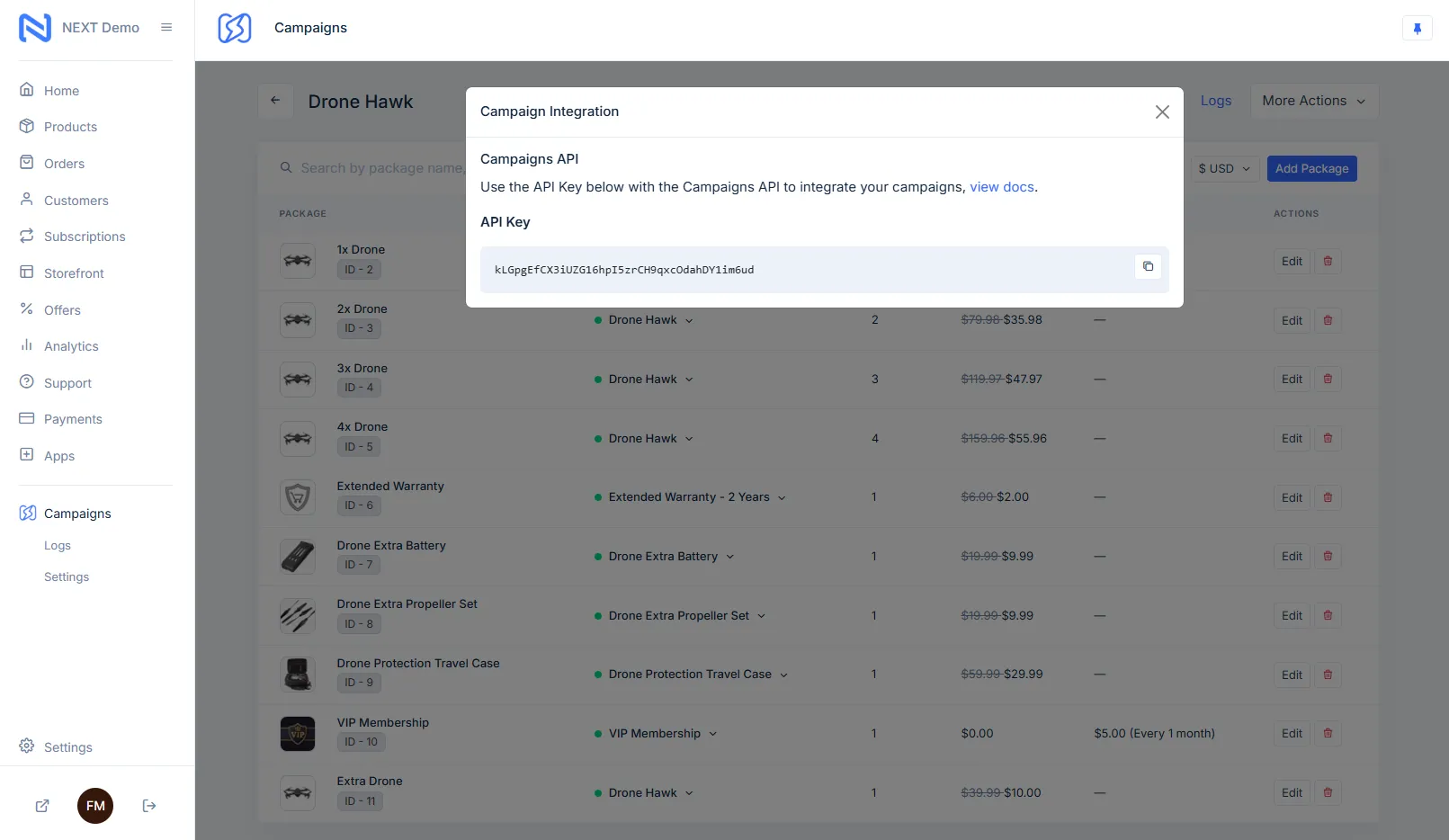
Go to Next Commerce Dashboard, open the Campaigns app, select your campaign, click on Integration, and copy your API key.
Add SDK Script
Add these two lines to your HTML <head> section:
<!-- Campaign Cart Configuration --><meta name="next-api-key" content="your-api-key-here">
<!-- Campaign Cart SDK --><script src="https://cdn.jsdelivr.net/gh/NextCommerceCo/[email protected]/dist/loader.js" type="module"></script>
Start Building
You can now use Campaign Cart attributes in your HTML!
<!-- Campaign Cart SDK --><script src="https://cdn.jsdelivr.net/gh/NextCommerceCo/[email protected]/dist/loader.js" type="module"></script>
<!-- With integrity check (recommended for production) --><scripttype="module"integrity="sha384-..."crossorigin="anonymous"></script># Install via npmnpm install @campaigncart/js-sdk
# Install via yarnyarn add @campaigncart/js-sdk
# Install via pnpmpnpm add @campaigncart/js-sdkThen import in your JavaScript:
// ES6 importimport CampaignCart from '@campaigncart/js-sdk';
// Initialize with your API keyCampaignCart.init({apiKey: 'your-api-key-here'});
// CommonJS requireconst CampaignCart = require('@campaigncart/js-sdk');# Download the SDKcurl -o campaign-cart.js https://cdn.jsdelivr.net/gh/NextCommerceCo/[email protected]/dist/loader.js
# Host on your server<script src="/js/campaign-cart.js"></script>// Install via WordPress admin1. Go to Plugins > Add New2. Search for "Campaign Cart"3. Install and activate
// Or upload manually1. Download from wordpress.org/plugins/campaign-cart2. Upload to /wp-content/plugins/3. Activate in WordPress adminConfigure the SDK using meta tags in your HTML head:
<!-- Required: Your API key --><meta name="next-api-key" content="your-api-key">
<!-- Optional: Page type for analytics --><meta name="next-page-type" content="product">
<!-- Optional: Enable debug mode --><meta name="next-debug" content="true">
<!-- Optional: Custom domain for API calls --><meta name="next-api-domain" content="api.yoursite.com">
<!-- Optional: Currency override --><meta name="next-currency" content="EUR">
<!-- Optional: Language/locale --><meta name="next-locale" content="en-US">For more advanced configuration, use JavaScript:
// Configure before SDK loadswindow.nextConfig = {apiKey: 'your-api-key',debug: true,currency: 'USD',locale: 'en-US',apiDomain: 'api.yoursite.com',features: {  analytics: true,  upsells: true,  exitIntent: false}};
// Or configure after initializationdocument.addEventListener('next:initialized', function() {next.configure({ debug: false, autoTrack: true});});<!-- Development with debug enabled --><meta name="next-api-key" content="dev_your-api-key"><meta name="next-debug" content="true"><meta name="next-env" content="development">
<script src="https://cdn.jsdelivr.net/gh/NextCommerceCo/[email protected]/dist/loader.js" type="module"></script><!-- Production with specific version --><meta name="next-api-key" content="live_your-api-key"><meta name="next-env" content="production">
<scripttype="module"></script><!-- Staging environment --><meta name="next-api-key" content="staging_your-api-key"><meta name="next-debug" content="true"><meta name="next-env" content="staging">
<script src="https://cdn.jsdelivr.net/gh/NextCommerceCo/[email protected]/dist/loader.js" type="module"></script>Verify the SDK loaded correctly:
// Open browser console and run:console.log(window.next ? 'SDK Loaded' : 'SDK Not Found');
// Check SDK versionif (window.next) {console.log('SDK Version:', next.version);}
// Check configurationif (window.next) {console.log('Config:', next.getConfig());}Enable debug mode to see detailed logs:
<!-- Enable via meta tag --><meta name="next-debug" content="true">
<!-- Or enable via JavaScript --><script>window.nextConfig = { debug: true };</script>
<!-- Or enable after load --><script>document.addEventListener('next:initialized', function() { next.enableDebug();});</script>SDK Not Loading
Attributes Not Working
next:initialized event)data-next-* attributesPerformance Issues
async attributeDocumentation
Browse our complete guides and API reference. View Docs →
Support
Contact our support team for help. Get Support →
Community
Join our Discord community. Join Discord →
Examples
See working examples and templates. View Examples →